
If you've recently started learning Git, there's a good chance you've come across two commands that seem to do the same thing:
git mergeand
git rebaseAt first glance, both combine changes from different branches. So naturally, the question is...
Why does Git even have two commands for the same job?
Fair question, right?
I used to wonder the exact same thing. Every tutorial explained how to use them, but very few explained why they both exist.
So instead of memorizing commands today, let's understand the problem Git is trying to solve. Once that clicks, choosing between Merge and Rebase becomes surprisingly easy.
Imagine This...
You're working on a Login Feature.
You create a new branch.
git checkout -b feature/loginEverything is going well.
You add a login page.
Then validation.
Then password reset.
Life is good.
But while you're busy building all this, another developer on your team has pushed several commits to the main branch.
Now pause for a second and think...
Your branch is now behind main.
How do you bring those latest changes into your branch without losing the work you've already done?
That's exactly the problem Merge and Rebase solve.
The destination is the same.
The journey is different.
Let's Start with Merge
Think about this.
Git has two separate histories.
One belongs to main.
The other belongs to your feature branch.
If Git simply combines them, how will it remember that they were once separate?
It has to leave some evidence, right?
That's why Git creates something called a Merge Commit.
Let's see it visually.
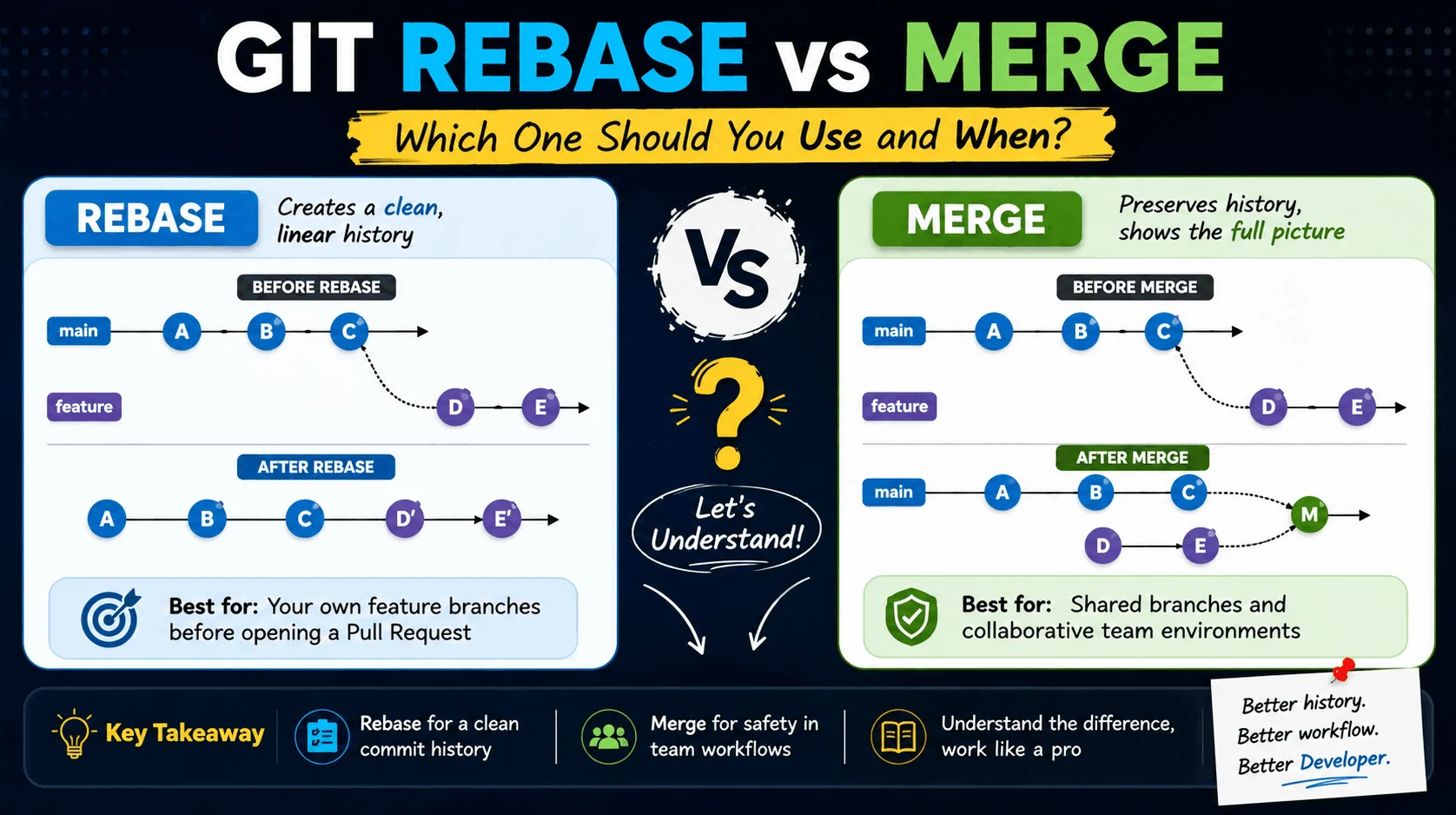
Before merging:
main
A ---- B ---- C
      \
feature D ---- E
Now you run:
git merge mainGit creates one extra commit.
A ---- B ---- C
      \        \
       D ---- E ---- M
That M is the Merge Commit.
Its only purpose is to tell Git,
These two histories met here.
Pretty simple, isn't it?
So Why Do People Like Merge?
Here's the biggest reason.
Merge never changes existing commits.
Read that again because it's important.
Your old commits stay exactly where they are.
Their commit IDs don't change.
Nothing is rewritten.
Git simply creates one additional commit to connect both histories.
That's why Merge is considered the safest option when multiple developers are working on the same project.
If someone else has already pulled your branch, Merge won't surprise them.
But There's a Small Catch...
Imagine your team has been working on a project for eight months.
Every feature...
Every bug fix...
Every release...
...creates another Merge Commit.
Now your Git history starts looking like this.
Merge branch 'main'

Merge feature/login

Merge feature/payment

Merge feature/profile

Merge release/v2.0
Can you still understand what actually happened?
Probably.
But it takes a little more effort.
The history starts feeling noisy.
And that's where Rebase enters the picture.
Now Let's Talk About Rebase
Before looking at the command, I want you to forget everything you know about "moving commits."
Because that's not really what Git does.
Here's what actually happens.
Git quietly picks up each of your commits...
...and recreates them one by one on top of the latest branch.
Sounds strange?
Let's make it visual.
Before Rebase:
main
A ---- B ---- C
      \
feature D ---- E
Now run:
git rebase mainGit rebuilds your commits.
A ---- B ---- C ---- D' ---- E'Notice something?
Those aren't the original commits anymore.
They're new versions.
That's why they have a '.
Git replayed your work as if you had started from the latest version of main.
Pretty clever, right?
Why Do Developers Love Rebase?
Now compare both histories.
Merge gave us this.
A ---- B ---- C
      \        \
       D ---- E ---- M
Rebase gave us this.
A ---- B ---- C ---- D ---- EWhich one would you rather read six months from now?
Exactly.
The second one tells a much cleaner story.
There's no extra Merge Commit.
Everything appears in one straight timeline.
That's why many teams prefer rebasing feature branches before opening a Pull Request.
But Here's the Dangerous Part
This is the one rule I wish someone had told me earlier.
Since Rebase recreates commits, their IDs change.
Now imagine this.
You've already pushed your branch.
Your teammate has already downloaded those commits.
Then you decide to run Rebase and push again.
What happens?
Now Git thinks those are completely different commits.
Suddenly your teammate sees duplicate history, conflicts, and unnecessary confusion.
Not fun.
So here's an easy rule to remember.
Rebase your own work.
Don't rebase history that other developers are already using.
If you follow just this one rule, you'll avoid a lot of Git headaches.
Here's What I Usually Do
People often ask,
"Okay... but what do you actually use?"
Here's my workflow.
While I'm still developing a feature, I like to keep my branch clean.
Before opening a Pull Request, I usually run:
git fetch origin
git rebase origin/main
That gives me the latest changes from main and keeps my commit history nice and linear.
But once my branch has been shared with the team, I stop rebasing it.
From that point onward, Merge is usually the safer choice.
Could I still rebase?
Yes.
Should I?
Usually not.
Merge vs. Rebase at a Glance
Merge | Rebase |
|---|---|
Creates a merge commit | Recreates your commits on top of another branch |
Keeps original commit history | Rewrites commit history |
Safest for shared branches | Best for your own feature branch |
History can become noisy | Creates a clean, linear history |
Great for collaboration | Great before opening a Pull Request |
So... Which One Should You Use?
If you were hoping for a single "best" answer, I'm going to disappoint you.
Because there isn't one.
Both commands exist for a reason.
Here's the simple approach I follow:
Working alone on your feature branch? Use Rebase to keep your history clean.
Working on a shared branch with teammates? Stick with Merge because it's safer.
Still unsure? Use Merge. It's harder to get yourself into trouble.
As you gain experience, you'll naturally know when Rebase makes more sense.
If You Remember Only One Thing...
Let me leave you with this thought.
Don't think of Merge and Rebase as competing commands.
Think of them as two different ways of telling your project's story.
Merge says,
"Let's preserve everything exactly as it happened."
Rebase says,
"Let's organize the story so it's easier to read."
Neither approach is wrong.
The best choice depends on your workflow and your team.
Once you understand why each command exists—not just how to type it—you'll stop second-guessing yourself every time Git asks you to choose between Merge and Rebase.
And trust me, that's a much better feeling than simply memorizing another Git command.
I hope this helped clear up the confusion between Git Merge and Rebase. If you still have any questions or think I missed something, drop a comment below. I'll do my best to answer it and, if needed, update this article so it helps others too.
Comments (0)
Want to join the conversation?
Log in or create a ShubhamLabs account to leave a comment.