
Introduction
Sometimes, the most dangerous bugs are the ones that don't throw errors.
While working on Sebiste, I encountered an issue in the CSV-to-JSON conversion process that highlighted one of JavaScript's easily overlooked behaviors: automatic numeric conversion can silently change the original data.
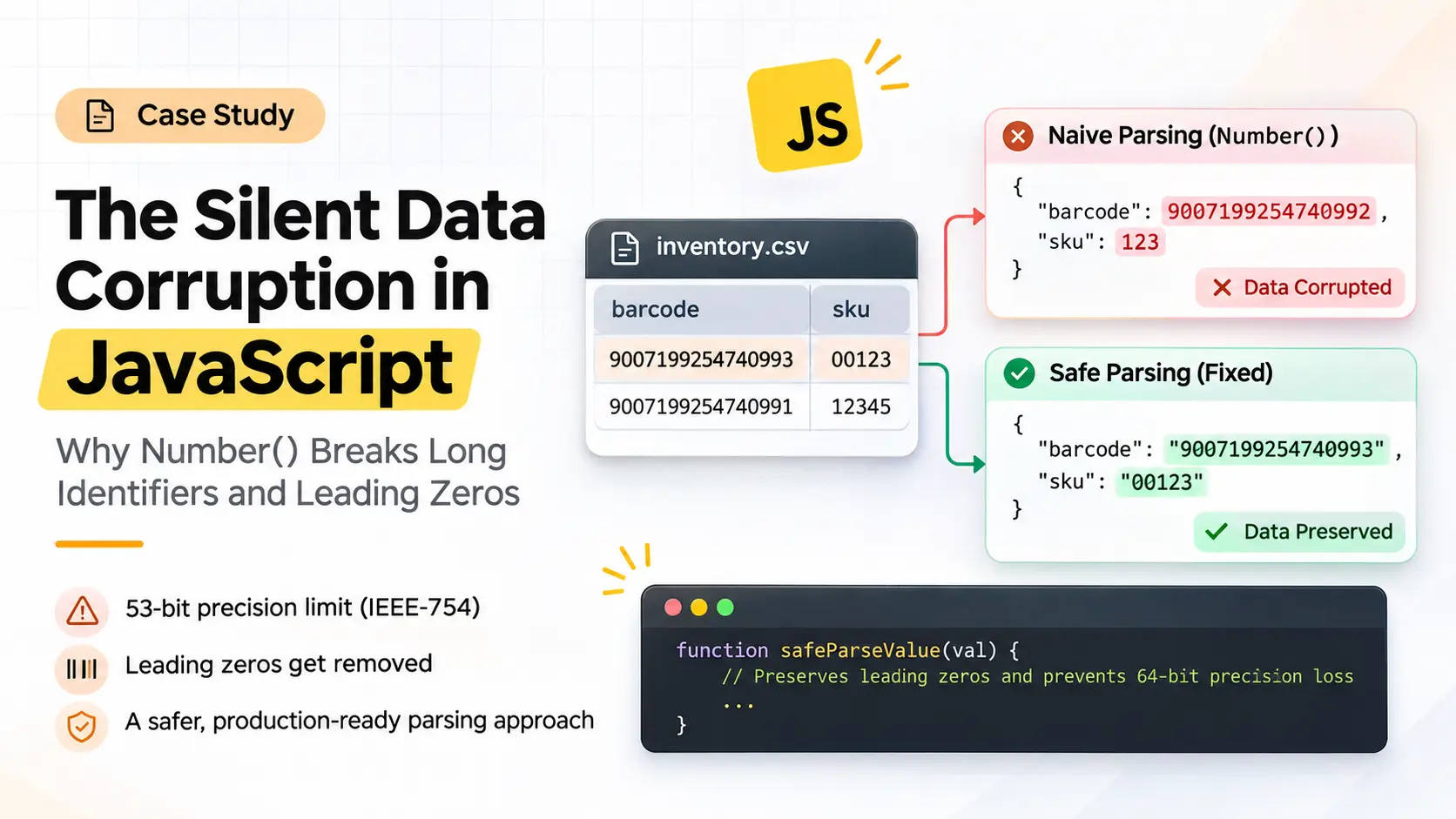
Consider a CSV file containing the following values:
barcode,sku,quantity
9007199254740993,00123,42
After processing the file, the resulting JSON contained:
{
  "barcode": 9007199254740992,
  "sku": 123,
  "quantity": 42
}
The conversion completed successfully. There were no exceptions, no obvious warnings, and no indication that anything had gone wrong.
However, two values had already been corrupted.
The barcode lost its original numeric precision.
The SKU lost its leading zeros.
This was not a CSV parsing problem. The issue was happening during type conversion.
The underlying reason was JavaScript's Number implementation and the assumption that every string containing digits should be converted into a number.
Let's understand why this happens, how to reproduce it, and how to implement a safer parsing strategy.
1. Understanding the Root Cause
The initial implementation followed a common approach:
function parseCellValue(value) {
    const trimmed = value.trim();

    if (trimmed.toLowerCase() === 'true') return true;
    if (trimmed.toLowerCase() === 'false') return false;
    if (trimmed.toLowerCase() === 'null') return null;

    if (!isNaN(trimmed) && trimmed !== '') {
        return Number(trimmed);
    }

    return value;
}
The intention was straightforward:
Convert numeric strings into numbers.
Convert
trueandfalseinto booleans.Convert
nullinto JavaScriptnull.Preserve everything else as a string.
For ordinary values, this works as expected.
Number("42");       // 42
Number("3.14");     // 3.14
Number("-15");      // -15
Number("00123");    // 123
The last example is where the problem becomes visible.
JavaScript does exactly what we asked it to do: interpret the string as a mathematical number.
But in real-world data processing, a numeric-looking string is not necessarily a number.
There are two separate problems to address.
2. Problem One: JavaScript's 53-Bit Integer Precision Limit
JavaScript uses the IEEE-754 double-precision floating-point format for its standard Number type.
Although the format occupies 64 bits, it provides 53 bits of integer precision, including the implicit leading bit.
This creates a limitation known as the safe integer range.
JavaScript exposes its boundaries through:
console.log(Number.MAX_SAFE_INTEGER);
// 9007199254740991

console.log(Number.MIN_SAFE_INTEGER);
// -9007199254740991
Within this range, every integer can be represented exactly.
Beyond it, JavaScript cannot guarantee that consecutive integers will have distinct representations.
What happens beyond the safe integer limit?
Let's test a few values:
console.log(Number("9007199254740991"));
// 9007199254740991

console.log(Number("9007199254740992"));
// 9007199254740992

console.log(Number("9007199254740993"));
// 9007199254740992

console.log(Number("9007199254740995"));
// 9007199254740996
Notice what happened.
The original value:
9007199254740993became:
9007199254740992The conversion did not fail. JavaScript simply rounded the value to a representable floating-point number.
This behavior can cause serious problems when handling:
Database
BIGINTprimary keys.Snowflake identifiers.
Long transaction references.
Product barcodes.
External API identifiers.
Distributed system identifiers.
For these values, even changing a single digit can make the identifier unusable.
The important distinction: A value can be a valid integer without being a safe JavaScript integer.
3. Problem Two: Leading Zeros Disappear
The second issue is much simpler but equally important.
Consider:
const sku = "00123";

console.log(Number(sku));
// 123
JavaScript removes the leading zeros because they have no mathematical significance.
But business identifiers are not mathematical quantities.
For example:
Original value | Converted value | Expected behavior |
|---|---|---|
|
| Preserve original |
|
| Preserve original |
|
| Preserve original |
|
| Depends on field meaning |
This matters in many applications:
Product SKUs: 00123 and 123 might represent two different inventory items.
Postal codes: Some postal codes begin with zero. Converting them into numbers changes their original representation.
Employee identifiers: Employee codes may use fixed-length numeric formats.
Bank and branch codes: Leading zeros can be part of the actual identifier.
There is another important consideration when exporting JSON.
According to RFC 8259, JSON numbers cannot contain leading zeros. For example, 00123 is not a valid JSON number.
Therefore, if the original representation must be preserved, it should be exported as a string:
{
  "sku": "00123"
}
4. Why This Is a Data Integrity Problem
The underlying issue is not simply that JavaScript has limited numeric precision.
It is that the application does not know the difference between a quantity and an identifier.
Consider these two values:
const quantity = "00123";
const barcode = "9007199254740993";
Both contain digits.
However, their meanings are different.
A quantity might need to participate in mathematical operations:
const total = Number("42") + Number("8");
// 50
A barcode is an identifier. It should retain its exact original representation:
const barcode = "9007199254740993";Converting identifiers into numbers introduces unnecessary risk.
A useful engineering principle is:
Numbers are for calculations. Strings are for identification.
This principle is especially important when processing external data, CSV files, spreadsheets, and API responses.
5. Implementing a Safer Parsing Strategy
The solution was to introduce additional validation before converting a string into a JavaScript number.
Instead of relying entirely on isNaN(), the parsing logic should evaluate the input more carefully.
The implementation follows these rules:
Handle boolean and null values.
Preserve numeric-looking strings with leading zeros.
Check integer values against JavaScript's safe integer boundaries.
Reject unsafe integer conversions.
Convert valid, finite decimal values when appropriate.
Preserve the original input whenever safe conversion cannot be established.
Updated implementation
function safeParseValue(val, parseTypes = true) {
    if (!parseTypes) return val;

    if (val === undefined || val === null) {
        return null;
    }

    const trimmed = String(val).trim();

    if (trimmed === '') {
        return null;
    }

    // 1. Handle boolean and null values
    const lower = trimmed.toLowerCase();

    if (lower === 'true') return true;
    if (lower === 'false') return false;
    if (lower === 'null') return null;

    // 2. Preserve leading-zero integer identifiers
    if (/^[+-]?0\d+$/.test(trimmed)) {
        return val;
    }

    // 3. Handle integer values safely
    if (/^[+-]?\d+$/.test(trimmed)) {
        try {
            const bigValue = BigInt(trimmed);

            const maxSafe = BigInt(Number.MAX_SAFE_INTEGER);
            const minSafe = BigInt(Number.MIN_SAFE_INTEGER);

            if (bigValue > maxSafe || bigValue < minSafe) {
                return val;
            }

            return Number(trimmed);
        } catch {
            return val;
        }
    }

    // 4. Handle decimal and scientific notation
    const isDecimal =
        /^-?(?:0|[1-9]\d*)\.\d+(?:[eE][+-]?\d+)?$/.test(trimmed);

    const isScientific =
        /^-?(?:0|[1-9]\d*)(?:[eE][+-]?\d+)$/.test(trimmed);

    if (isDecimal || isScientific) {
        const num = Number(trimmed);

        if (!Number.isFinite(num)) {
            return val;
        }

        // Avoid converting integers outside the safe range.
        if (Number.isInteger(num) && !Number.isSafeInteger(num)) {
            return val;
        }

        // Avoid silently converting nonzero values to zero.
        if (num === 0 && /[1-9]/.test(trimmed)) {
            return val;
        }

        return num;
    }

    // 5. Preserve the original value
    return val;
}
Why use BigInt?
BigInt allows JavaScript to represent arbitrarily large integers without the precision limitations of the standard Number type.
For example:
const value = BigInt("9007199254740993");

console.log(value);
// 9007199254740993n
Unlike Number, this value remains exact.
In this implementation, BigInt is used to validate whether an integer falls within the safe range before converting it to a regular JavaScript number.
If the value exceeds that range, the original string is preserved.
This avoids introducing precision loss during conversion.
Important: This implementation is a safer general-purpose parser, not a replacement for schema-based validation. Decimal values are still subject to IEEE-754 floating-point precision limitations. For financial or high-precision decimal data, retain strings or use a decimal arithmetic library.
6. Before vs. After: Verifying the Fix
Let's compare the behavior using representative test cases.
CSV input | Naive conversion | Safe conversion |
|---|---|---|
|
|
|
|
|
|
|
|
|
|
|
|
|
|
|
|
|
|
|
|
|
|
|
|
We can also verify the implementation directly:
console.log(safeParseValue("00123"));
// "00123"

console.log(safeParseValue("9007199254740993"));
// "9007199254740993"

console.log(safeParseValue("9007199254740991"));
// 9007199254740991

console.log(safeParseValue("42"));
// 42

console.log(safeParseValue("true"));
// true

console.log(safeParseValue("0.123"));
// 0.123
The important difference is that the updated implementation does not blindly convert every numeric-looking string.
It checks whether conversion is appropriate before changing the original representation.
7. An Additional Lesson: Type Inference Has Its Limits
While the updated parser reduces the risk of accidental data corruption, there is an even better approach for applications that handle structured business data.
Use schema-based type conversion whenever the expected structure is known.
For example:
const schema = {
    barcode: 'string',
    sku: 'string',
    quantity: 'number',
    price: 'number'
};
This makes the intended data types explicit.
A barcode should remain a string regardless of how many digits it contains.
A quantity can be converted into a number because mathematical operations are expected.
This is more reliable than trying to infer the meaning of a value from its characters alone.
Generic parsing is useful when the input structure is unknown, but schema-based parsing is preferable when the application knows what each field represents.
8. Key Takeaways
This issue reinforced several important lessons about handling external data in JavaScript.
Never rely solely on
isNaN()to decide whether a value should be converted.Understand the limitations of IEEE-754 floating-point numbers.
Use
Number.isSafeInteger()when working with integer values.Preserve identifiers as strings, even when they contain only digits.
Use
BigIntwhen exact large-integer representation is required.Validate data before converting it.
Prefer schema-based parsing when the expected data structure is known.
Never assume that a successful conversion means the original data was preserved.
Conclusion
A successful data conversion does not necessarily mean a correct data conversion.
The issue in Sebiste was a good reminder that small assumptions in type conversion can have significant consequences when processing real-world data.
JavaScript's Number type is perfectly suitable for many everyday calculations. However, it should not be treated as a universal representation for every numeric-looking value.
A barcode is not a quantity. A SKU is not an arithmetic value. A database identifier does not need to become a JavaScript number just because it contains digits.
Preserving the original data should always come before making the data look cleaner.
Sometimes, the best way to fix a data conversion problem is simply to avoid converting data that was never meant to be a number in the first place.
Comments (0)
Want to join the conversation?
Log in or create a ShubhamLabs account to leave a comment.